
February Update
Since our last blog, the dev team has been hard at work delivering a range of practical improvements across the platform. From enhanced notification options within Project Workflow, to drag-and-drop functionality for Project and CRM Notes, we’ve focused on making everyday tasks faster and more intuitive.
We’ve also released the new Project Mail feature and introduced the ability to edit and manage scheduled holidays — giving you greater flexibility and control across your projects.
Alongside all these improvements we are in the home stretch of testing our brand new Financial Management release which we will sneak peek below, our new Branch mail feature including Outlook and Google syncing and our new and improved Mailchimp feature.
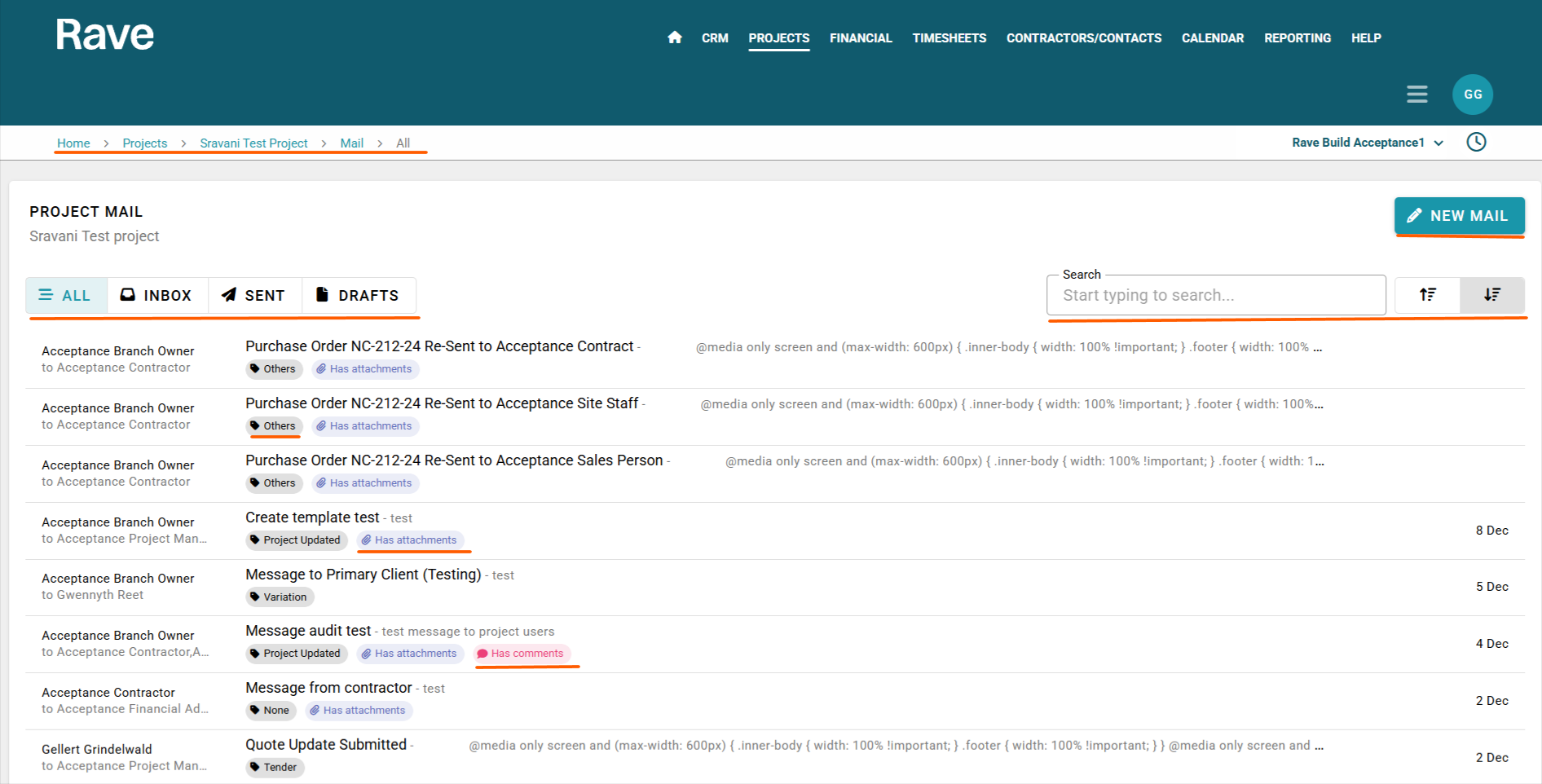
As part of our upcoming Email Syncing feature, we’ve upgraded Messages to Mail, introducing a refreshed interface and significantly enhanced functionality to improve both CRM and Project communication.
CRM and Project Mail allows you to manage all enquiry and project-related emails in one place, with the ability to view inbox, sent items, deleted and drafts, search mail content, create new messages, comment on threads, forward mail, and manage recipients. You can also control visibility settings to determine who can view specific mail threads.
New Mail Templates (both personal and branch-level) make it faster to send consistent, professional communication across CRM and Project Mail. You can also save drafts, attach files, and choose whether messages are internal only or also sent to recipients’ external email addresses.
Advanced permissions give you control over who can view, manage, or delete mail at both user and project levels — ensuring communication remains organised and secure.
Overall, Project Mail centralises communication, improves workflow efficiency, and gives you greater control over how project correspondence is managed.
To read more about CRM mail click here. To read more about Project mail click here.
Project Workflow Notifications
Following the success of our Project Workflow view, we’ve now introduced notification options to keep you even more informed.
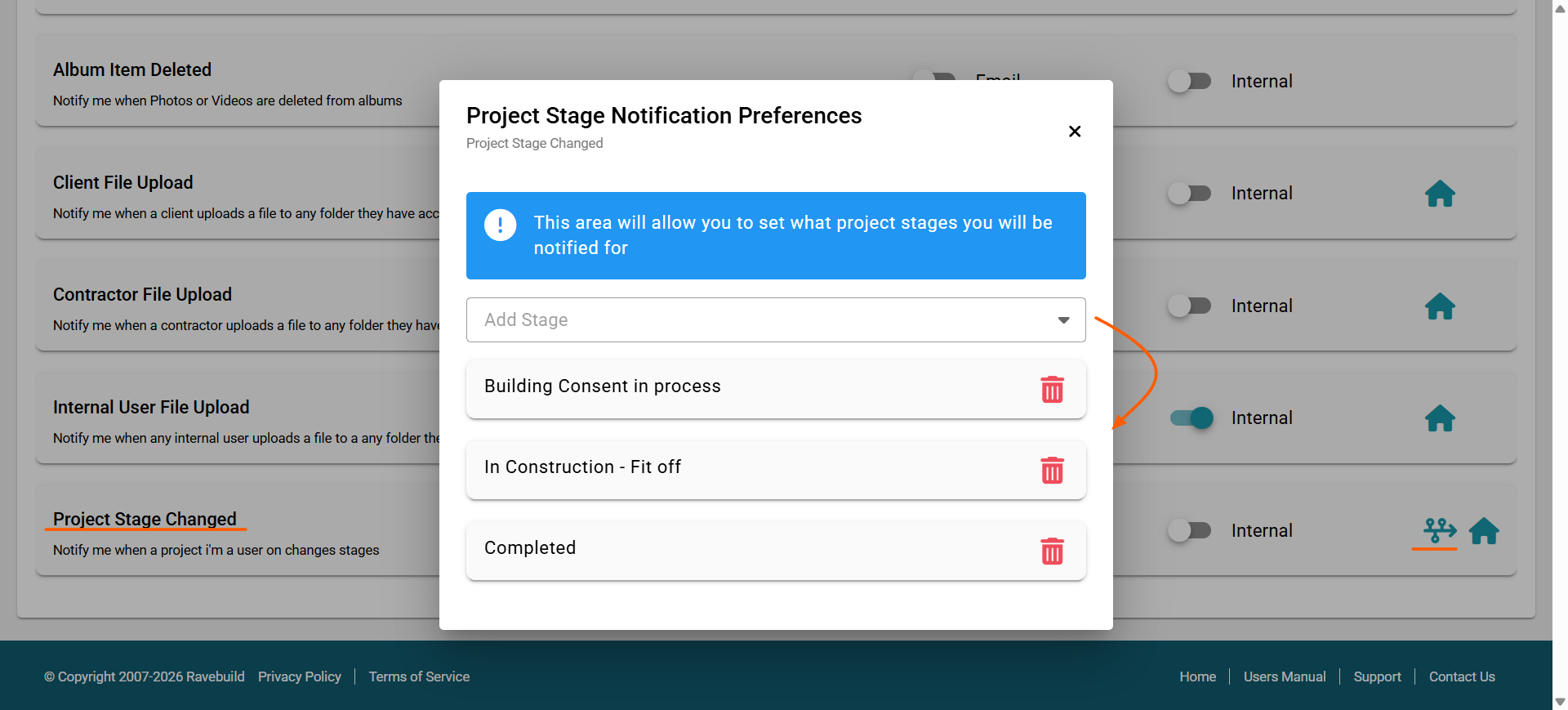
Users with the appropriate permissions can opt to receive notifications when specific project stages are reached. For example, you can choose to be notified when a project moves into a particular stage of the process.
Simply select the stages you’d like to track using the stage selector, and if needed, apply project-specific overrides to receive notifications for only certain projects.
This gives you greater visibility over project progress and ensures you’re alerted at the moments that matter most.
To read more about setting this notification permission click here. To read more about how Project Stages work click here.
Albums
Rave Albums already allows you to export images to PDF and share them across different areas of the platform. We’ve now expanded those capabilities even further.
You can now share album items directly to Client Files, Contractor Files, Client Notes, Enquiry Notes, Project Notes, and Client Project Notes, in addition to the existing sharing locations.
This makes it even easier to store visual records exactly where they’re needed, improving documentation, communication, and keeping all project information connected in one place.
To read more about our Export to feature in Rave Albums click here.

Schedule Gantt Print Options
Our flexible Schedule printing options make it quick and easy to generate clear, professional Task List and Gantt printouts tailored to exactly what you need. Our latest update also allows you to exclude Hidden Tasks and My Hidden Tasks when printing, giving you even greater control over what’s shared. This way, when printing for a client or specific Contractor you can exclude hidden tasks from them.
To read more about Schedule Print options click here.

Drag and Drop and Preview on Notes in Rave
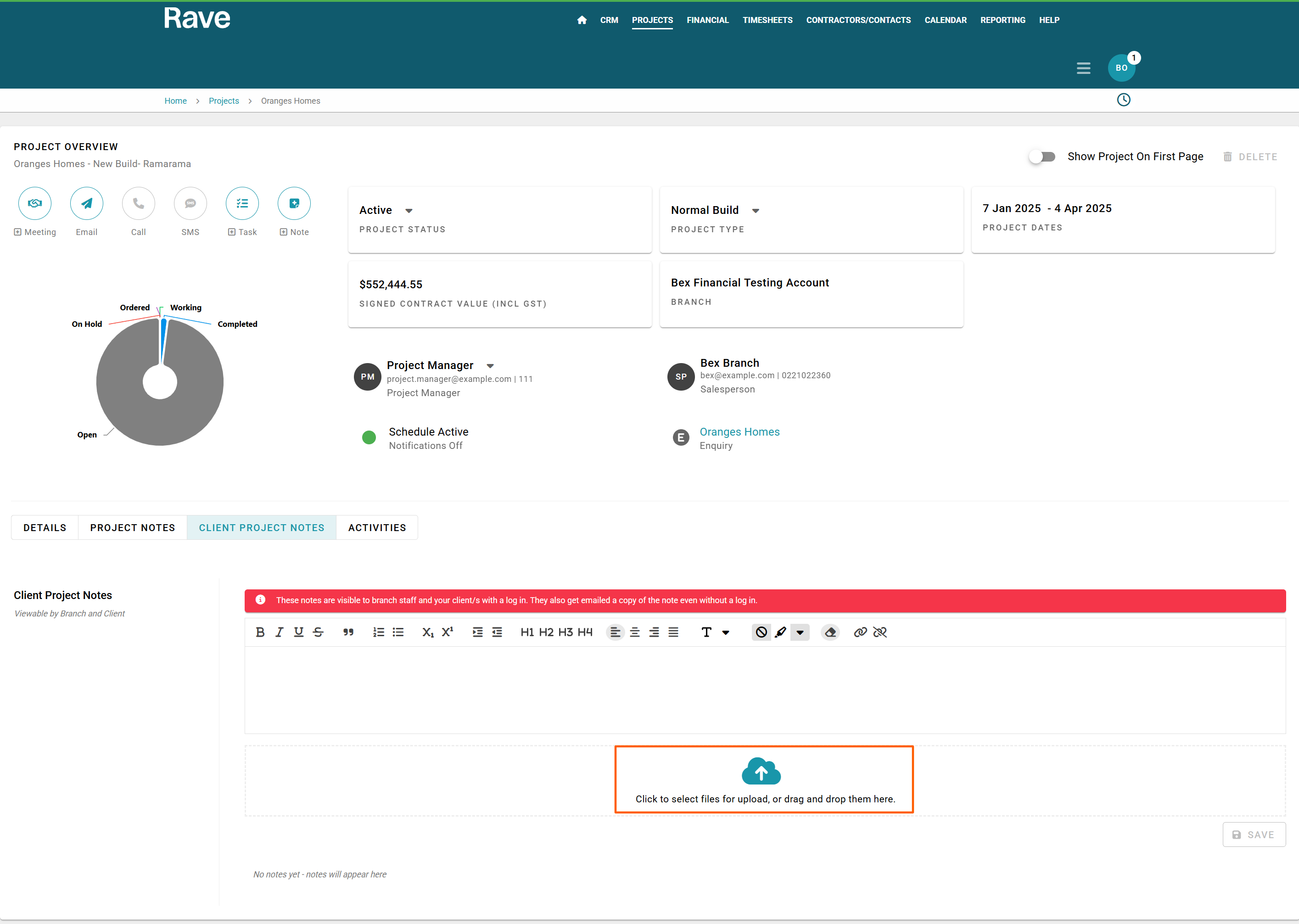
With the upgrade to our CRM and Project features, we have also made changes to Notes. You can now drag and drop images into any of the 'Notes' sections in Rave. Client Profile Note, Enquiry Notes, Project Notes, Project Client Notes and the Branch Notes feature. This also includes support for uncommon file types like .HEIC. Anywhere in Rave where you see the Cloud Icon with an upwards arrow this indicates you can drag and drop the attachment or click on the icon and load from your device.
You can also now Preview supported File Types inside Rave without needing to download. If there are multiple images/videos you can scroll through the preview and then choose to click the 3 dot ellipses to download or print. If the file type doesn't support preview the modal will allow you to download only.
To read more about CRM notes click here. To read more about Project notes click here.
New Proposal Style for Financial Management - Simple with Line Item Description
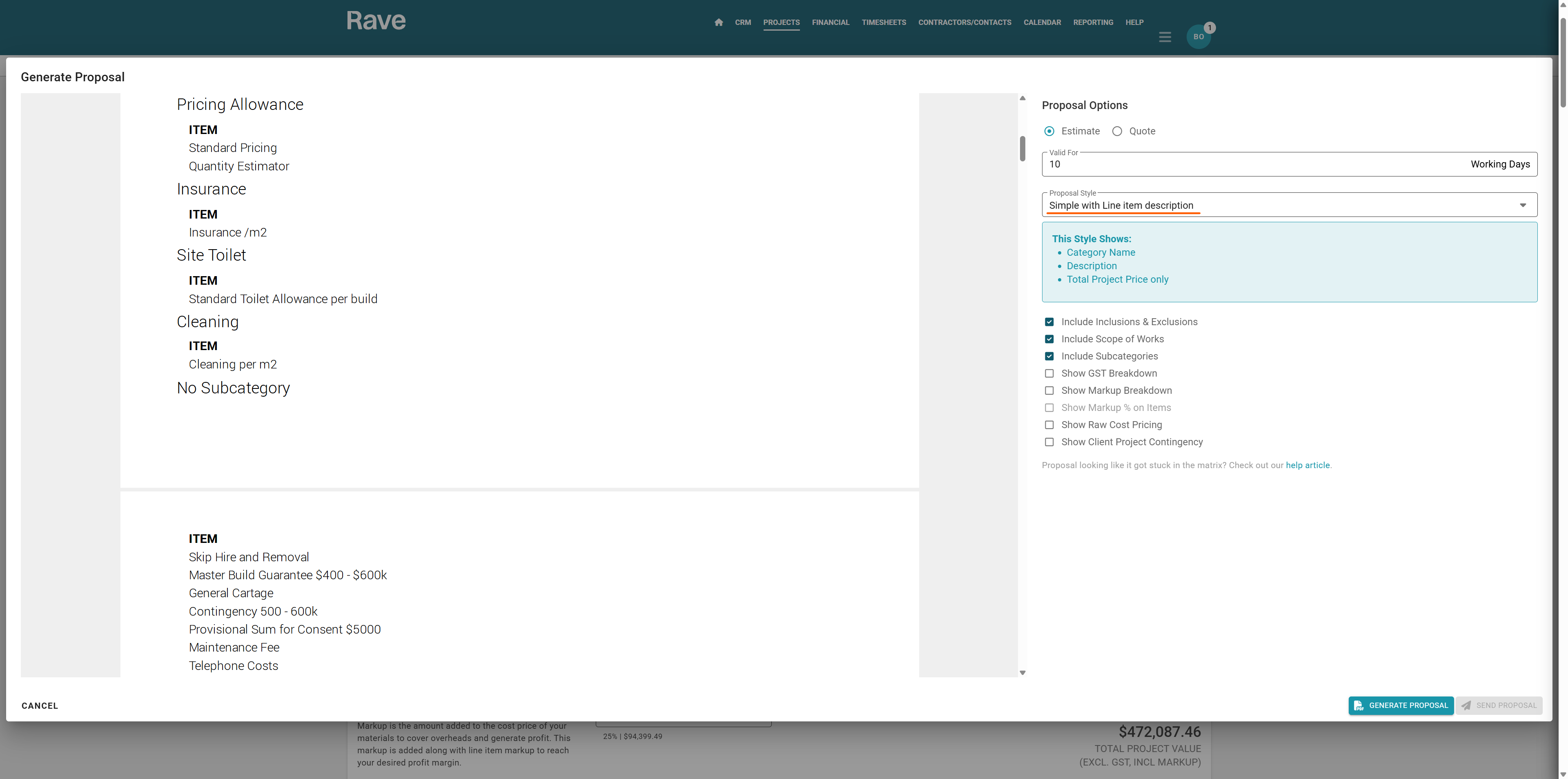
With the new Simple with Line Item Description style, you can generate Proposals and Variations that include Category and Subcategory names (if required), along with line item descriptions and the total project price, giving clients greater clarity while keeping detailed pricing confidential.
Plus, with nine additional proposal styles to choose from and flexible options for GST, markup, and contingency, you can tailor every proposal to suit your project and client requirements.
To read more about estimate proposals click here.
Sneak Peek Mailchimp
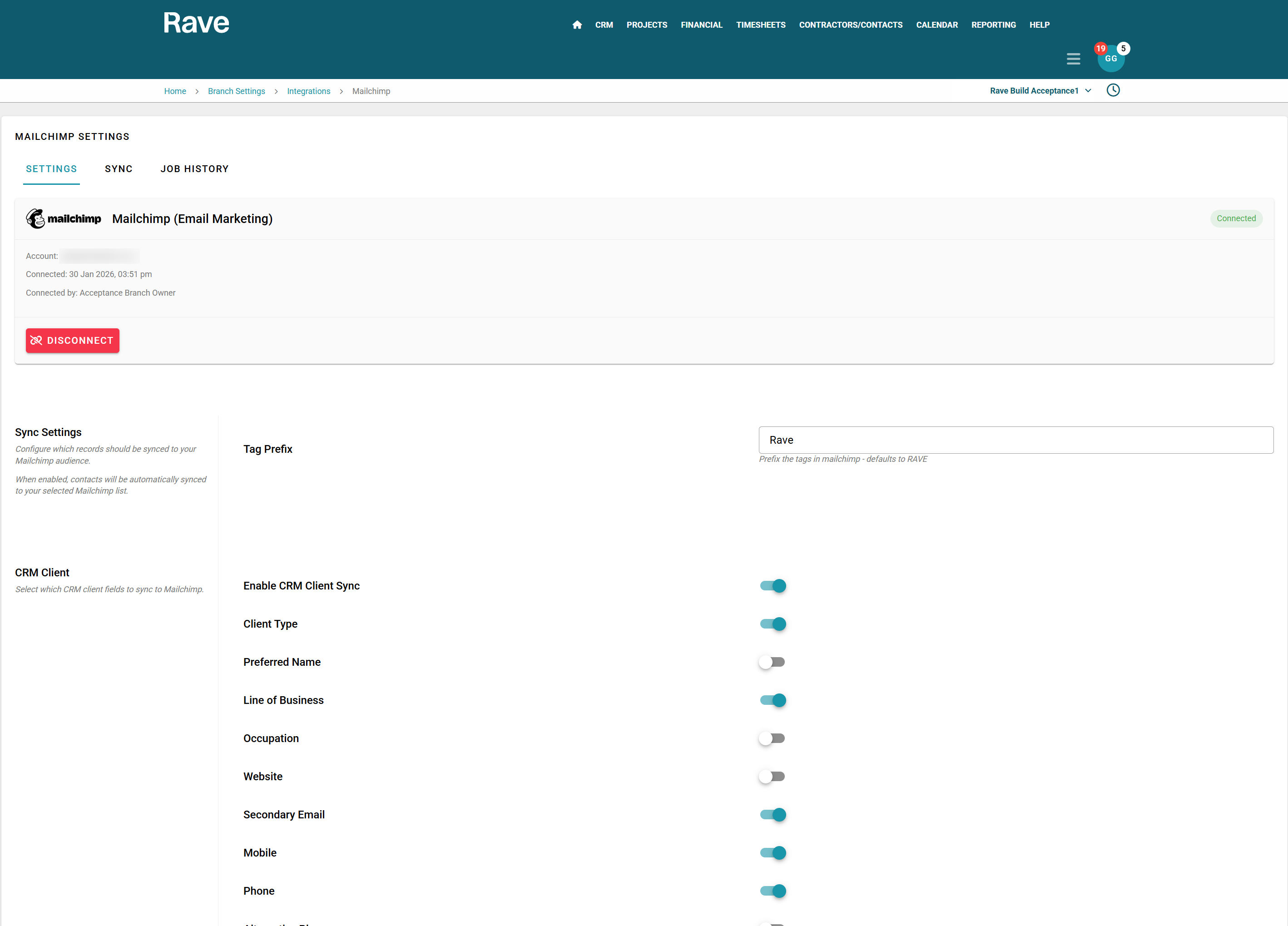
You’ll soon be able to connect your Rave Build account directly to Mailchimp. Choose the data you want to send, apply your preferred tags, and you’re good to go. Enjoy seamless, live updates from Rave Build straight into Mailchimp, making it easier than ever to keep your contacts organised and your marketing up to date. With over 50 tag options we have you covered.
Sneak Peek Financial Rewrite
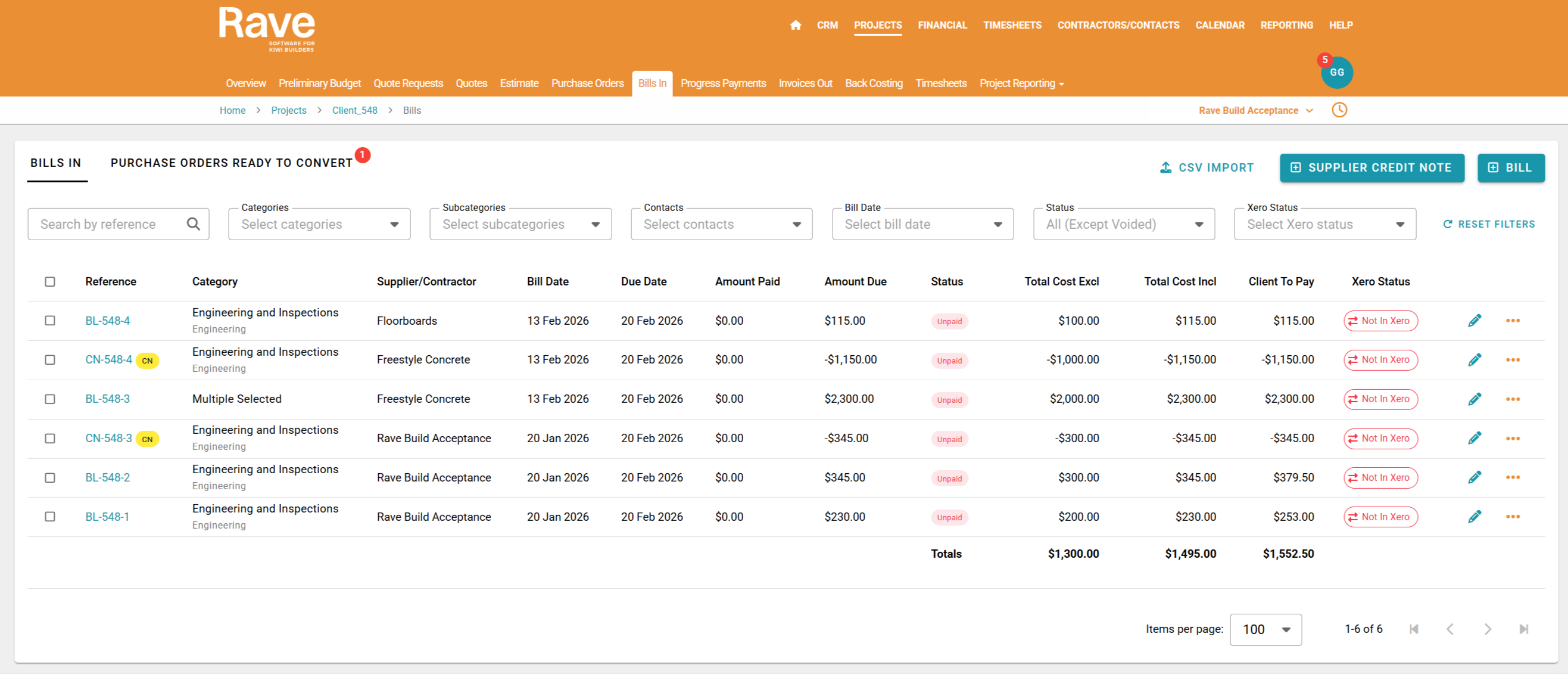
We’ve been working behind the scenes to deliver a range of enhancements designed to make our Financial Management tool even more powerful and easier to use. This update introduces a refreshed user interface with smoother navigation, while maintaining the familiar look and feel you’re used to.
Quote Management: Export quotes and import them into new projects, save quotes as drafts, create a single Purchase Order from multiple quotes (to one supplier), and create a single Bill from multiple Purchase Orders.
Bulk Updates: Bulk update categories, markup, and account codes across all list pages.
Improved Accuracy: Fixes to previous rounding issues for improved financial accuracy, along with enhanced Financial Audits providing more detailed insights.
Branch-Level Enhancements: New dedicated Branch Quotes and Branch Purchase Orders pages, with the existing Branch Bills page retained.
Billing & On-Charging: On-charge directly from bills, updated progress payments with Tax Inclusive, Tax Exclusive, or No Tax options, and separate tax code fields for cost and sell pricing.
Contractor Improvements: Contractors can now manage templates within their login.
Document Consolidation: Consolidate documents by supplier, category, or sub-category, with additional consolidation options for greater flexibility.
Xero Integration: Further enhancements to improve consistency and efficiency.
We will also deliver more consistent functionality across all document types. Together, these improvements are designed to help you work more efficiently and with greater confidence.
As always if you have a new feature idea, an upgrade to an existing feature or a product request please send it to help@ravebuild.co.nz and our product team will be in touch.
