April Rave Updates - Blog
We're excited to share a range of new updates across Rave that are designed to improve performance, increase efficiency, and give your team even greater control over how you manage projects, clients, and communications.
Before we take a look at whats new here is a sneak peek of What’s Coming Up at Rave
Files - A complete redesign focused on usability and accessibility:
New, more intuitive layout
Full transparency with no hidden folders or files
Fully responsive and mobile-friendly
Centralised document storage across Rave
Full Customisation of both main folders and subfolders
OCR Enhancements - Improving automation and financial workflows:
Reduced manual data entry
Improved accuracy for bills, credit notes, and documents
Faster processing and workflows
Better visibility and audit tracking
Enhanced line-item matching
Checklist Overhaul - Driving consistency and audit readiness:
More reliable checklist completion
Stronger audit trails
Easier creation and management
Fewer missed steps and less rework
Mobile-friendly experience
Expanding checklists into the CRM
Website Leads to Rave CRM - Seamless capture and flow of website leads directly into your Rave CRM.
Single Sign-On (SSO) - Simplifying access with secure, unified login across Rave.
And now whats New?
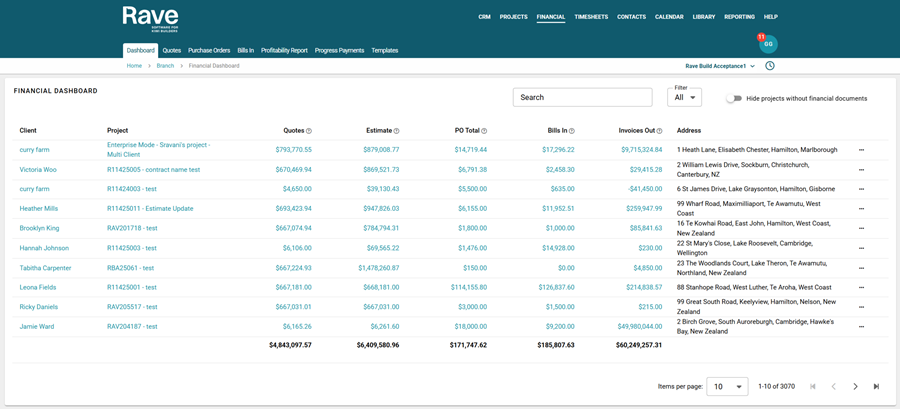
Financial Management Release
The Rave team has spent the past six months building our brand-new financial management release, and it truly has been a labour of love. Because this financial component spans so many areas of Rave, it has been one of the most significant updates we’ve ever delivered. The level of effort poured into the design, development, testing, article creation, client communications, and last night’s release has been nothing short of incredible.
Change can be hard, especially when you’ve been using the same system for years, but we’re confident these updates will impress. We haven’t just improved GST and rounding; we’ve completely refreshed the look and feel of our Create, View, and Edit pages, giving them a cleaner, more modern look and feel.
To read more about this release and the links to the new help articles, click here.
Mailchimp Marketing Integration
The construction industry in New Zealand has traditionally relied on referrals, reputation, and word of mouth to win new work. While those channels remain important, modern builders are increasingly receiving enquiries through websites, social media, and online advertising.
For many construction companies, the challenge is no longer generating enquiries. The challenge is managing them effectively.
Potential clients often take months to decide on building projects. Without consistent follow-up and communication, it’s easy for enquiries to go quiet or choose another builder who stays top of mind.
That’s where digital tools such as CRM systems and email marketing platforms can make a real difference.
To read more about the Raves Mailchimp release, click here for the help article.

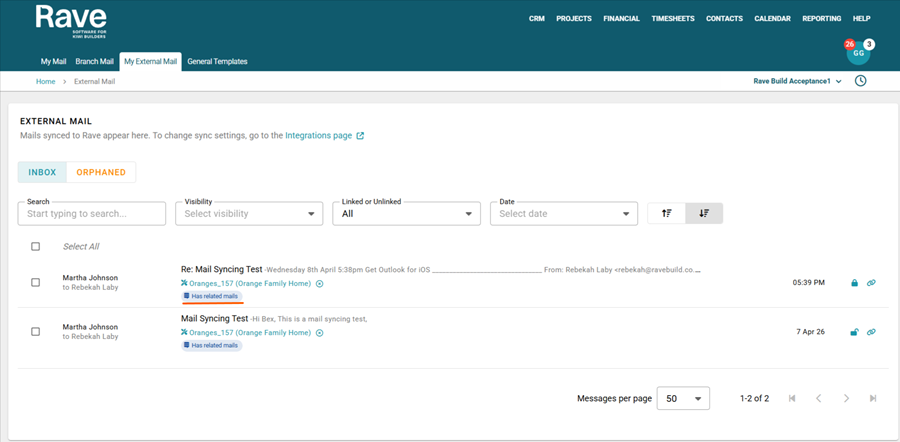
Office 365 External Mail Syncing
At Rave, we’re always looking for ways to make communication clearer, faster, and more connected across your entire business. That’s why we’re excited to introduce one of our most anticipated updates yet. Office 365 External Email Syncing.
This new feature is designed to bring all your communication into one place, so you can spend less time switching between tools and more time getting projects moving.
To read more about this release and links to the help articles, click here.
Brand New Rave Calendar
Managing your time effectively is key to staying on top of projects, meetings, and tasks. The Rave Calendar is designed to bring everything together in one place, giving you a clear and organised view of your activities across both Rave and your external calendars with Calendar Syncing Enabled.
To read more about this release and links to the help articles, click here.

View Allocated Projects Only
We’ve introduced a new permission for Tier One (top-tier) users: “View Allocated Projects Only.” This allows you to grant access to specific projects, so users can focus on managing only the projects assigned to them. You can find this permission under the Manage Users section of Branch Settings.
Customise Your Task Gantt Columns
Rave Scheduling’s Task Gantt view allows you to choose which columns are displayed in your report. This means you can hide selected columns to maximise space and focus on your Gantt chart. Even better, this functionality is available across all three scheduling modes—Classic, Advanced, and Enterprise. Click the link to read the rave help article.
New My Notifications Page for all Users
Keeping up with Notifications in Rave is now easier than ever with the new My Notifications page. You can quickly read your notifications and mark them as read or unread to come back to later. Click the link to read the Rave help article.
Ability to Merge Enquiries in CRM
Merging an enquiry usually occurs when duplicate enquiries have been created, whether accidentally, due to a client submitting multiple requests, or from uploading a CSV file that includes repeated entries for the same client. It is now easy to merge these into a single enquiry, allowing you to select and retain the most relevant information from each record.
Click the link to read the Rave help article.
New Project Summary Report for Projects Team
The Project Summary Report is ideal for internal project update meetings, team check-ins, and quick status reviews across multiple projects. It enables the entire team to view and discuss the latest notes in a clear, easy-to-use format. With the most recent Project notes and/or Client project notes as the key focus. Click the link to read the Rave help article.
User Preferences
Rave is introducing more profile-specific settings, starting with defaults for CRM page filters, activity settings, and the Project Overview page. Click the link to read the Rave help article.
CRM Export and Import feature update
We have developed a custom Client Import feature that enables bulk management of existing clients and enquiries, as well as efficient creation of new records. Click the link to read the Rave help article.
New Mail Features
Rave Mail now supports scheduled sending, and read tracking is available with view count limits (depending on whether your external provider blocks that content from being sent).
Audit Trail
The new Branch-level Project and Financial Audit Trail now consolidates both financial management and project audit logs; we are currently migrating all historical audit data into this system before retiring the old project-based audit trail. Click here to read the Financial Audit update and gain access to our other audit articles.